The way websites are built has changed significantly over the last few years. Modern websites are no longer limited to a single platform handling everything from content management to the user interface.
One architecture that has become increasingly popular among developers is the headless CMS.
A headless CMS separates the content management system from the website’s frontend. This allows developers to manage content in one place while using modern technologies such as Next.js, React, Vue, or other frameworks to build the actual website.
In this guide, we’ll look at what a headless CMS is, how it works, its advantages and disadvantages, and when developers should consider using one.
What Is a Headless CMS?
A headless CMS is a content management system that provides a backend for creating and managing content without controlling how that content is displayed.
Traditional CMS platforms usually combine two major components:
- Content management
- Website presentation
A headless CMS separates them.
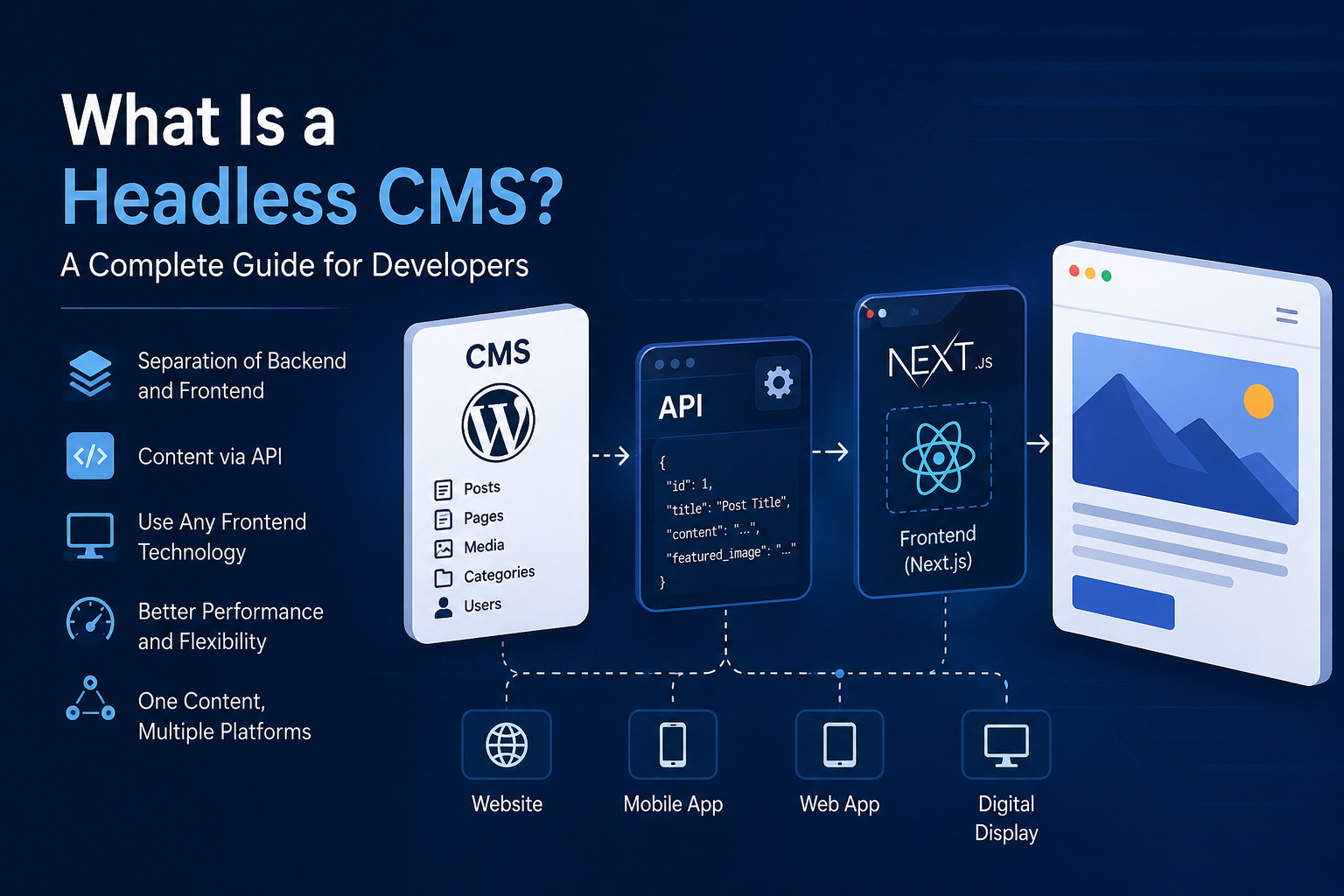
The CMS manages content and exposes that content through an API. A frontend application then retrieves the content and decides how it should be displayed.
A simple architecture looks like this:
CMS → API → Frontend → User
For example, WordPress can be used as the content management system while Next.js handles the frontend.
WordPress manages posts, pages, images, categories, and other content. Next.js retrieves that information through an API and renders it as a modern website.
How Does a Headless CMS Work?
The basic process is relatively simple.
First, an administrator creates content inside the CMS. The content is stored in the CMS database.
The CMS then exposes that content through an API, usually using REST or GraphQL.
The frontend application sends a request to the API and receives structured data, commonly in JSON format.
For example:
Frontend
   ↓
API Request
   ↓
Headless CMS
   ↓
JSON Response
   ↓
Frontend
   ↓
Web Page
This separation means the CMS doesn’t need to know exactly how the website looks.
The frontend is responsible for presentation, while the CMS is responsible for content.
Traditional CMS vs Headless CMS
In a traditional CMS, the backend and frontend are closely connected.
For example:
WordPress
   ↓
Theme
   ↓
HTML Website
   ↓
Visitor
The CMS controls both the content and the presentation.
With a headless architecture, the structure is different:
WordPress
   ↓
REST API
   ↓
Next.js
   ↓
Website
   ↓
Visitor
The CMS becomes a content platform rather than the website itself.
Why Use a Headless CMS?
There are several reasons developers choose this architecture.
1. Flexible Frontend
Developers can use modern frontend technologies without being restricted by the CMS theme system.
For example, a team can use:
- Next.js
- React
- Vue
- Nuxt
- Svelte
- Astro
The CMS doesn’t dictate the frontend technology.
2. Better Developer Experience
Modern frameworks provide powerful tools for routing, rendering, caching, image optimization, and application development.
Instead of modifying a traditional CMS theme, developers can build the frontend using the tools and architecture they already know.
3. Reusable Content
The same content can be used across multiple platforms.
For example, a company could use one CMS to provide content to:
Website
Mobile App
Web Application
Digital Display
Other Services
The content remains in one central location while different applications consume it through APIs.
4. Improved Performance
A modern frontend framework can use techniques such as static generation, server-side rendering, caching, and edge delivery.
This can result in very fast websites when the architecture is implemented correctly.
However, a headless CMS does not automatically make a website faster. Performance depends on how the frontend and API are designed.
5. Better Separation of Responsibilities
The content team can work inside the CMS while developers work on the frontend independently.
This creates a cleaner separation:
Content Team
     ↓
    CMS
     ↓
    API
     ↓
Developers
     ↓
 Frontend
Is WordPress a Headless CMS?
WordPress was originally designed primarily as a traditional CMS, but it can also be used as a headless CMS.
WordPress provides a REST API that allows external applications to retrieve content.
For example:
/wp-json/wp/v2/posts
can return WordPress posts as JSON data.
A frontend application can then use that information to create its own pages.
This makes WordPress an attractive option for teams that want the familiar WordPress administration interface while using a modern frontend.
Headless WordPress With Next.js
One popular combination is WordPress with Next.js.
The architecture can look like this:
              WordPress
             CMS / Admin
                  │
                  │ REST API
                  ▼
               Next.js
              Frontend
                  │
                  ▼
              Website
WordPress handles:
- Blog posts
- Pages
- Categories
- Media
- Authors
- Custom content
Next.js handles:
- Routing
- UI
- Page rendering
- Performance
- Metadata
- Structured data
- User experience
This gives developers the flexibility of a modern frontend while keeping WordPress’s content management capabilities.
What Are the Disadvantages?
Headless CMS architecture isn’t perfect for every project.
More Development Work
You now have two separate systems instead of one.
Developers need to build and maintain the frontend separately from the CMS.
API Dependency
The frontend depends on the CMS API.
If the API becomes unavailable or is poorly designed, the frontend may be affected depending on the application’s caching and rendering strategy.
More Complex Deployment
A traditional WordPress website can often be deployed as a single application.
A headless architecture usually requires managing both the CMS and frontend environments.
SEO Requires Proper Implementation
A headless CMS does not automatically provide good SEO.
The frontend must correctly generate:
- Page titles
- Meta descriptions
- Canonical URLs
- Open Graph metadata
- Structured data
- Sitemaps
- Robots directives
The CMS can store SEO information, but the frontend must use that information correctly.
When Should You Use a Headless CMS?
A headless CMS is particularly useful when:
- You want a highly customized frontend.
- You want to use modern frontend frameworks.
- The same content needs to be used across multiple platforms.
- Performance is an important requirement.
- Developers need complete control over the user interface.
- Your content management system is separate from your website.
For a simple blog or small business website, a traditional CMS may be easier and faster.
For larger applications, custom platforms, content-heavy websites, and products requiring a highly customized frontend, headless architecture can be a strong choice.
Final Thoughts
A headless CMS changes the relationship between content and presentation.
Instead of asking the CMS to control the entire website, the CMS becomes a central place to manage content while the frontend application controls the user experience.
The result is a more flexible architecture:
Content
   ↓
CMS
   ↓
API
   ↓
Modern Frontend
   ↓
Users
WordPress, combined with a framework such as Next.js, is one example of how this architecture can be implemented.
The most important thing is not simply choosing a headless CMS. The real advantage comes from designing the CMS, API, frontend, caching, security, and SEO strategy to work together as one system.