Tag: WordPress

  • How Much Does an Ecommerce Website Cost in Bangladesh?

    How Much Does an Ecommerce Website Cost in Bangladesh?

    If you’re planning to start an online store, one of the first questions you may have is: How much does an ecommerce website cost in Bangladesh?

    The cost of building an ecommerce website can vary significantly depending on the number of products, design requirements, payment gateways, features, technology, security, hosting, and ongoing maintenance.

    In Bangladesh, you can build a basic online store with a relatively small budget, while a large custom ecommerce platform can require a significantly higher investment.

    This guide explains ecommerce website price in Bangladesh, the factors that affect development costs, and what you should consider before hiring an ecommerce development company.

    Average Ecommerce Website Cost in Bangladesh

    There is no fixed price for an ecommerce website because every project has different requirements.

    As a general guide, ecommerce website development in Bangladesh may fall into these ranges:

    Ecommerce Website Type Estimated Cost in Bangladesh
    Basic Ecommerce Website ৳30,000 – ৳60,000
    Professional Ecommerce Website ৳60,000 – ৳150,000
    Advanced Ecommerce Website ৳150,000 – ৳300,000+
    Custom Ecommerce Platform ৳300,000 – ৳1,000,000+

    These are estimated ranges rather than fixed market prices. The final cost depends on the features, design, technology, integrations, and development requirements of your project.

    What Determines Ecommerce Website Cost in Bangladesh?

    Several factors influence the total ecommerce website cost Bangladesh businesses need to consider.

    1. Website Design

    The design of your online store has a major impact on development cost.

    A basic store may use a professionally designed or customized theme, while a larger brand may require a completely custom UI/UX design.

    Custom design may include:

    • Homepage design
    • Product listing pages
    • Product detail pages
    • Shopping cart
    • Checkout page
    • Customer dashboard
    • Mobile layouts
    • Custom banners
    • Brand-specific visual elements

    A more customized design generally requires more time and development resources.

    2. Number of Products

    The number of products you plan to sell can also affect the project.

    A small store with 20–50 products may be relatively straightforward to set up.

    A large ecommerce business with hundreds or thousands of products may require:

    • Advanced product categories
    • Product variations
    • Bulk product import
    • Inventory management
    • Advanced search
    • Filtering
    • Product attributes
    • Automated stock management

    If you already have product information in Excel or another system, bulk import functionality can also be considered.

    3. Ecommerce Platform

    The technology used to build your online store is another important factor.

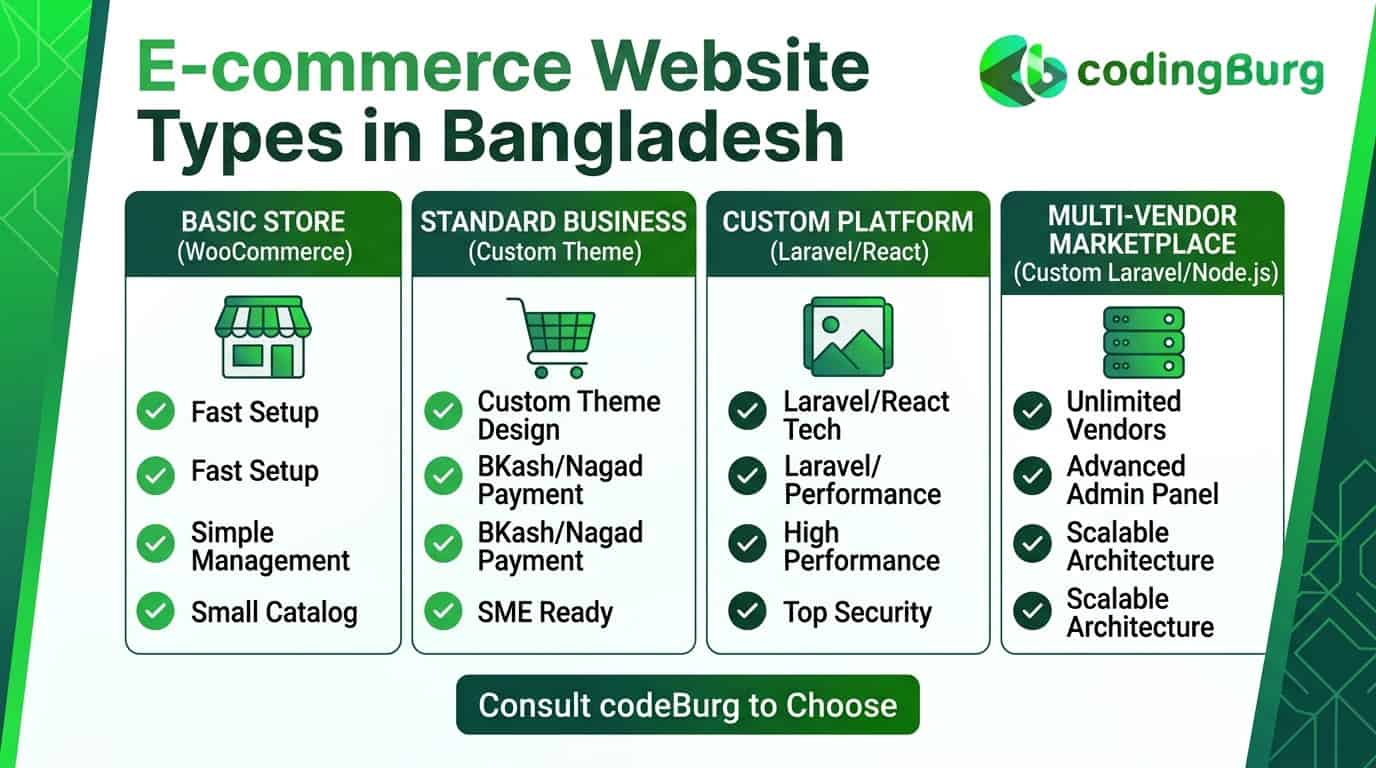
    Popular options include:

    • WordPress + WooCommerce
    • Shopify
    • Laravel
    • React
    • Node.js
    • Custom ecommerce platforms

    For small and medium-sized businesses, WooCommerce can be a practical option because it provides many ecommerce features without requiring every component to be developed from scratch.

    Businesses with complex requirements may choose custom ecommerce development.

    4. Payment Gateway Integration

    A Bangladesh-based ecommerce store may need local payment options.

    Depending on your target customers, you may want to support:

    • bKash
    • Nagad
    • Card payments
    • Internet banking
    • Mobile financial services
    • Cash on Delivery

    Payment gateway integration may involve additional development and configuration costs.

    The exact requirements depend on the payment providers and the type of integration required.

    5. Shipping and Delivery Integration

    An ecommerce website may also need delivery or courier integration.

    Depending on your business model, you may require:

    • Delivery charge calculation
    • Location-based shipping
    • Order tracking
    • Courier API integration
    • Delivery status updates
    • Cash-on-delivery handling

    If your business works with a third-party courier service, API integration may require additional development.

    6. Product Management System

    A professional ecommerce website should make it easy for administrators to manage products.

    An admin panel may allow you to:

    • Add products
    • Edit product information
    • Upload images
    • Manage categories
    • Set prices
    • Create discounts
    • Manage inventory
    • Track orders
    • Manage customers

    The complexity of the admin system can affect the overall ecommerce development Bangladesh cost.

    7. Shopping Cart and Checkout

    The shopping experience is one of the most important parts of an ecommerce website.

    A good checkout system should make it easy for customers to:

    1. Select products
    2. Add products to the cart
    3. Review their order
    4. Enter delivery information
    5. Select a payment method
    6. Confirm the order

    A complicated checkout process can create unnecessary friction, so businesses should focus on making it simple and user-friendly.

    8. Mobile Responsive Design

    A modern ecommerce website should work properly across different devices.

    Your online store should be optimized for:

    • Smartphones
    • Tablets
    • Laptops
    • Desktop computers

    Mobile responsiveness should be considered during development rather than treated as an optional feature.

    9. SEO Features

    If you want customers to discover your products through Google and other search engines, SEO-friendly development is important.

    An ecommerce website may require:

    • SEO-friendly URLs
    • Product metadata
    • Category optimization
    • XML sitemap
    • Schema markup
    • Image optimization
    • Fast loading speed
    • Mobile optimization
    • Internal linking

    SEO itself is a separate marketing process, but the website should provide a strong technical foundation for SEO.

    10. Website Speed and Performance

    Website speed is especially important for ecommerce websites.

    Customers may leave a website if pages take too long to load.

    Performance optimization can include:

    • Image compression
    • Caching
    • Lazy loading
    • Database optimization
    • Code optimization
    • CDN configuration
    • Efficient hosting

    The level of optimization required will depend on the size and expected traffic of your store.

    Basic vs Professional vs Custom Ecommerce Website

    Understanding the differences between ecommerce website packages can help you choose the right solution.

    Basic Ecommerce Website

    A basic ecommerce store may include:

    • Responsive design
    • Product pages
    • Categories
    • Shopping cart
    • Checkout
    • Basic payment options
    • Order management
    • Contact page

    This option can be suitable for small businesses starting online.

    Professional Ecommerce Website

    A professional ecommerce website may include:

    • Custom or premium design
    • Advanced product management
    • Payment gateway integration
    • Shipping configuration
    • Coupons and discounts
    • Customer accounts
    • Order tracking
    • SEO-friendly structure
    • Advanced search and filtering

    This can be suitable for growing businesses with a larger product catalog.

    Custom Ecommerce Website

    A custom ecommerce platform is designed around the specific requirements of a business.

    It may include:

    • Custom admin dashboard
    • Advanced inventory management
    • ERP integration
    • CRM integration
    • Custom payment workflows
    • Multiple vendor functionality
    • Advanced reporting
    • Custom APIs
    • Automated business processes

    Custom ecommerce development generally requires more time and investment.

    Additional Costs to Consider

    The initial development price isn’t the only expense when launching an online store.

    You may also need to budget for:

    Domain Name

    Your domain is your website’s online address.

    For example:

    yourbusiness.com

    Domain prices vary depending on the extension and registrar.

    Web Hosting

    Your ecommerce website needs hosting to store its files and database.

    The hosting cost depends on:

    • Server resources
    • Traffic
    • Storage
    • Performance requirements
    • Security
    • Backup requirements

    SSL Certificate

    An SSL certificate enables HTTPS and helps protect information transferred between users and your website.

    Premium Themes and Plugins

    If you use WordPress and WooCommerce, some premium themes or plugins may require separate licenses.

    Maintenance

    After launching your store, you may need ongoing:

    • Security updates
    • Backups
    • Bug fixes
    • Performance optimization
    • Plugin updates
    • Technical support

    These ongoing costs should be considered when calculating the total cost of running an ecommerce business.

    How Much Does a WooCommerce Website Cost in Bangladesh?

    WooCommerce is a popular option for businesses that want to build an online store using WordPress.

    The total WooCommerce website cost depends on:

    • Theme
    • Plugins
    • Number of products
    • Customization
    • Payment gateway
    • Shipping integration
    • Hosting
    • Security
    • Development requirements

    A basic WooCommerce store can cost less than a highly customized ecommerce platform.

    For businesses with standard ecommerce requirements, WooCommerce can provide a flexible foundation that can be expanded as the business grows.

    How Much Does a Custom Ecommerce Website Cost?

    A custom ecommerce website can cost significantly more than a basic WordPress or WooCommerce store.

    The reason is simple: features are designed and developed specifically for the business.

    For example, a custom store may require:

    • Custom UI/UX
    • Custom backend
    • Database architecture
    • API development
    • Payment integrations
    • Inventory systems
    • Customer dashboards
    • Advanced reporting
    • Third-party integrations

    The final price should therefore be based on the project’s requirements rather than a fixed package.

    How to Reduce Ecommerce Website Development Costs

    If your budget is limited, there are several ways to control development costs without sacrificing essential functionality.

    Start With Essential Features

    Instead of developing every possible feature from day one, launch with the features your customers actually need.

    Additional functionality can be added later.

    Use WordPress and WooCommerce

    For many small and medium-sized businesses, WooCommerce can reduce development time because many ecommerce features are already available.

    Choose a Suitable Hosting Plan

    You don’t necessarily need the most expensive hosting package when launching a small store. You can upgrade as traffic and business requirements increase.

    Avoid Unnecessary Plugins

    Installing too many plugins can increase maintenance requirements and may affect performance. Use only the functionality your business actually needs.

    How to Choose an Ecommerce Development Company in Bangladesh

    Choosing the right development partner is just as important as choosing the right technology.

    Before hiring an ecommerce development company, check:

    • Previous ecommerce projects
    • Client reviews
    • Development experience
    • Technology expertise
    • Payment integration experience
    • Communication process
    • Project timeline
    • Maintenance support
    • Pricing and scope
    • Website ownership

    Ask for a detailed proposal so you understand exactly what is included in the price.

    Questions to Ask Before Building an Ecommerce Website

    Before starting your project, ask your developer:

    1. Which platform do you recommend and why?
    2. What features are included?
    3. Is the website mobile responsive?
    4. Will payment gateways be integrated?
    5. Can I manage products myself?
    6. Will the website be SEO-friendly?
    7. Is hosting included?
    8. What security measures will be implemented?
    9. What happens after the website launches?
    10. Do you provide maintenance and technical support?

    Getting clear answers before development begins can help avoid unexpected costs later.

    Is an Ecommerce Website Worth the Investment?

    For many businesses, an ecommerce website can become an important sales channel.

    An online store can allow you to:

    • Sell products 24/7
    • Reach customers outside your local area
    • Accept online orders
    • Build your brand
    • Collect customer data
    • Run digital marketing campaigns
    • Expand your product range

    However, the website is only one part of an ecommerce business. Marketing, product quality, customer service, delivery, pricing, and business operations also play important roles.

    Others: Custom Website vs WordPress in Bangladesh: Which Should Your Business Choose?

    Final Thoughts

    The ecommerce website cost in Bangladesh depends on the size and complexity of your project.

    A basic ecommerce website may be suitable for a small business starting online, while a professional or custom ecommerce platform may be more appropriate for a growing business with advanced requirements.

    Before choosing a development package, consider your budget, product catalog, payment methods, delivery system, expected traffic, future growth, and required features.

    The goal should not simply be to find the cheapest ecommerce website price in Bangladesh. Instead, choose a solution that provides the features and scalability your business actually needs.

    Build Your Ecommerce Website

    Ready to take your business online?

    Whether you need a WordPress/WooCommerce store, professional ecommerce website, or custom ecommerce solution, the right development approach can help you build a strong foundation for your online business.

    Build Your Ecommerce Website with CodingBurg and turn your online business idea into reality.
  • Custom Website vs WordPress in Bangladesh: Which Should Your Business Choose?

    Custom Website vs WordPress in Bangladesh: Which Should Your Business Choose?

    Choosing the right platform is one of the most important decisions when building a business website. For businesses in Bangladesh, two popular options are a custom website vs WordPress Bangladesh But which one is right for your business? The answer depends on your budget, business goals, required features, scalability, maintenance needs, and how much customization you need. In this guide, we’ll compare custom website vs WordPress in Bangladesh and explain the key differences so you can make an informed decision for your business.

    What Is a Custom Website?

    A custom website is developed specifically for a business based on its unique requirements. Instead of relying on a pre-built CMS structure or theme, developers create the website’s functionality, design, and architecture according to the project’s needs.

    Custom websites can be developed using technologies such as:

    • PHP
    • Laravel
    • React
    • Node.js
    • JavaScript
    • MySQL
    • Custom APIs

    A custom solution can be useful when a business requires unique functionality that may not be easily achievable with standard WordPress plugins or themes.

    What Is WordPress?

    WordPress is a popular content management system (CMS) that allows businesses to create and manage websites without developing every feature from scratch.

    WordPress can be extended with:

    • Themes
    • Plugins
    • Page builders
    • E-commerce solutions
    • SEO plugins
    • Security tools
    • Custom development

    For many small and medium-sized businesses, WordPress can provide a practical way to launch a professional website within a relatively limited budget.

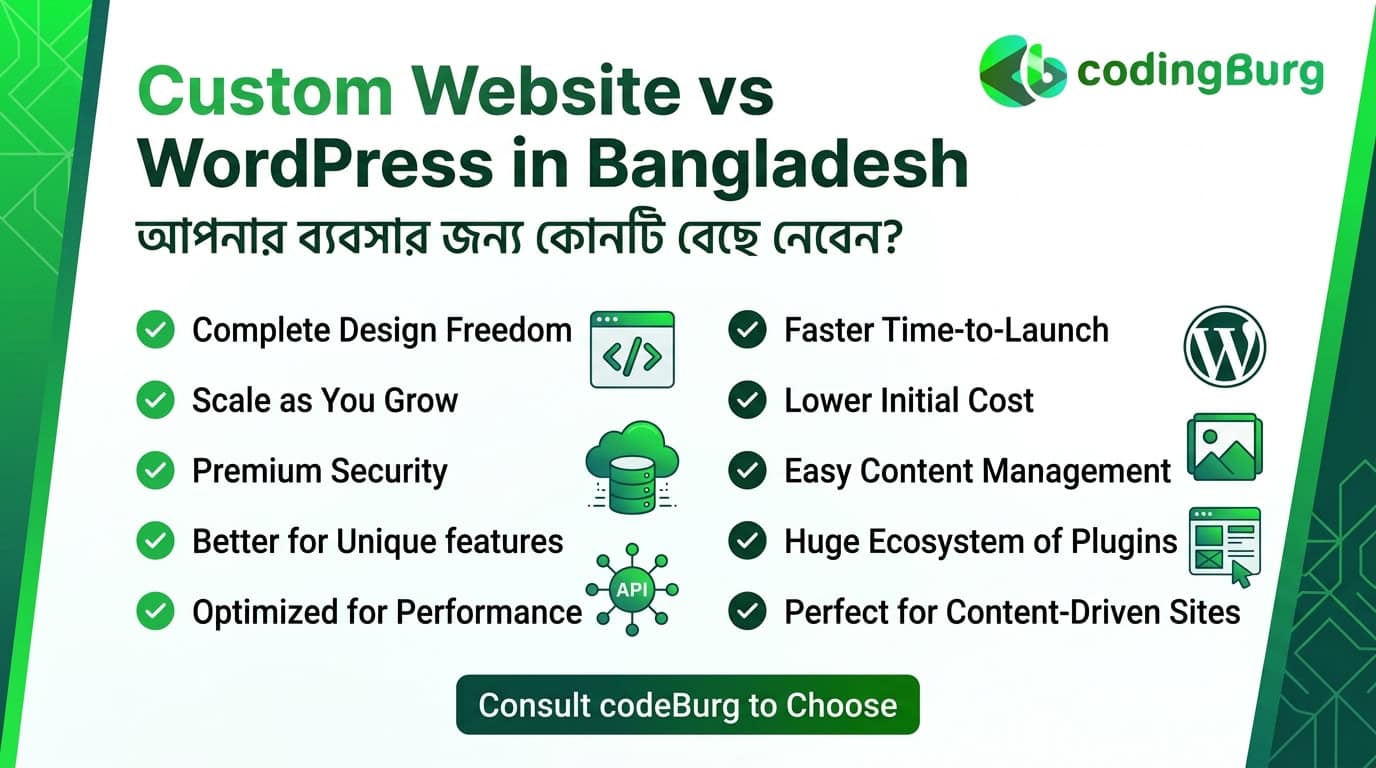
    Custom Website vs WordPress: Key Differences

    When comparing WordPress vs custom website, several factors should be considered.

    Feature WordPress Custom Website
    Initial cost Generally lower Generally higher
    Development time Usually faster Usually longer
    Customization High with themes/plugins Very high
    Ease of content management Easy Depends on development
    Plugin ecosystem Extensive Custom integrations
    Scalability Suitable for many businesses Can be designed specifically for scale
    Maintenance Updates required Developer-dependent
    Unique functionality May require custom development Easier to build from scratch
    Technical dependency Moderate Usually higher
    Best for Business sites, blogs, stores Complex or highly customized systems

    The right choice depends on your specific requirements rather than simply choosing the more expensive technology.

    WordPress vs Custom Website: Which Is More Affordable in Bangladesh?

    Budget is often one of the biggest considerations for businesses in Bangladesh.

    A WordPress website can often be more affordable because many components are already available, including themes, plugins, and CMS functionality.

    A custom website generally requires more development time because features are built specifically for the project.

    However, the total cost depends on the website’s requirements.

    WordPress Costs May Include:

    • Domain
    • Hosting
    • Premium theme
    • Plugins
    • Design customization
    • Development
    • Security
    • Maintenance

    Custom Website Costs May Include:

    • UI/UX design
    • Front-end development
    • Back-end development
    • Database development
    • API integration
    • Custom features
    • Security implementation
    • Testing
    • Maintenance

    Instead of comparing only the initial price, businesses should consider the long-term requirements of the project.

    Which Option Is Faster to Build?

    If you need to launch your website quickly, WordPress can often provide a faster development process.

    A developer can start with an existing theme or design framework and customize it according to your brand.

    A custom website usually requires more stages, including:

    1. Requirement analysis
    2. UI/UX planning
    3. Database planning
    4. Front-end development
    5. Back-end development
    6. Testing
    7. Security checks
    8. Deployment

    Therefore, custom development may take longer, especially for complex projects.

    Which Offers More Customization?

    When it comes to customization, a custom website provides greater control over how the website works.

    For example, a business may need:

    • A unique booking system
    • Custom customer dashboards
    • Advanced membership functionality
    • Complex pricing systems
    • Custom CRM integration
    • Specialized reporting
    • Business-specific workflows

    These features can be developed specifically for the business.

    WordPress can also be customized extensively, but highly specialized requirements may require custom plugins or additional development.

    Which Is Easier to Manage?

    WordPress is generally easier for non-technical users to manage.

    After development, business owners can use the WordPress dashboard to:

    • Add pages
    • Publish blog posts
    • Upload images
    • Edit content
    • Manage products
    • Update menus

    A custom website can also have an easy-to-use administration panel, but its content management experience depends on how the system was developed.

    If your team frequently updates website content, a CMS such as WordPress can be convenient.

    Which Is Better for SEO?

    Both WordPress and custom websites can be optimized for search engines.

    SEO performance depends on factors such as:

    • Website structure
    • Page speed
    • Mobile responsiveness
    • Content quality
    • Technical SEO
    • Internal linking
    • Metadata
    • Image optimization
    • Server performance

    WordPress offers many SEO tools and plugins that can simplify optimization.

    A custom website gives developers greater control over the underlying code and architecture, which can be useful for technically advanced SEO requirements.

    The platform itself does not automatically guarantee better search rankings.

    Which Is Better for E-Commerce?

    For businesses selling products online, WordPress combined with WooCommerce can be a practical solution for many stores.

    It can provide features such as:

    • Product management
    • Shopping cart
    • Checkout
    • Payment integration
    • Order management
    • Customer accounts
    • Discount codes

    A custom e-commerce platform may be more suitable when a business requires highly specialized functionality or complex integrations.

    For example, a large business may need custom inventory management, advanced pricing rules, multiple systems integration, or specialized business workflows.

    Which Is More Secure?

    Security depends heavily on how the website is developed, configured, maintained, and hosted.

    WordPress websites require regular attention to:

    • Core updates
    • Plugin updates
    • Theme updates
    • Strong passwords
    • User permissions
    • Security monitoring
    • Backups

    Custom websites also require secure coding, server configuration, authentication controls, updates, monitoring, and regular maintenance.

    Neither option should be considered automatically secure simply because of the technology used.

    WordPress vs Custom Website for Small Businesses in Bangladesh

    For many small businesses, the main priorities are often affordability, fast deployment, easy content management, and a professional appearance.

    A WordPress website may be suitable for businesses such as:

    • Restaurants
    • Local service providers
    • Agencies
    • Consultants
    • Small retailers
    • Personal brands
    • Startups
    • Corporate businesses

    If the website mainly needs pages such as Home, About, Services, Portfolio, Blog, and Contact, WordPress can be a practical option.

    When Should You Choose a Custom Website?

    A custom website may be more appropriate when your business requires functionality that goes beyond a typical business website.

    Consider custom development if you need:

    • Complex business logic
    • Custom dashboards
    • Large-scale web applications
    • Advanced user roles
    • Complex API integrations
    • Custom booking systems
    • Specialized automation
    • Unique workflows
    • High levels of architectural control

    In these situations, building a solution specifically around your business requirements may be more appropriate.

    When Should You Choose WordPress?

    WordPress can be a good option when your priorities include:

    • Lower initial development costs
    • Faster website launch
    • Easy content management
    • Blogging
    • Business websites
    • Service websites
    • Portfolio websites
    • Small and medium-sized e-commerce stores
    • Regular content publishing

    It can also be extended through custom development if the standard WordPress functionality does not meet all your requirements.

    Custom Website vs WordPress: Long-Term Considerations

    The initial development cost should not be the only factor when choosing a platform.

    Think about your website three to five years from now.

    Ask yourself:

    • Will the website need new features?
    • How often will content change?
    • Will traffic increase?
    • Will you need integrations?
    • Will multiple employees manage the website?
    • Will you sell products online?
    • Will you need a customer dashboard?
    • Will the website become part of a larger business system?

    Answering these questions can help determine whether WordPress or custom development makes more sense for your business.

    Common Mistakes Businesses Make

    When choosing between custom website vs WordPress Bangladesh, businesses sometimes make decisions based only on price.

    Other common mistakes include:

    Choosing the Cheapest Developer

    A lower initial price doesn’t always mean lower total cost. Consider quality, support, security, and future development requirements.

    Choosing Custom Development Without a Real Need

    Custom development can provide flexibility, but if your website only needs standard business features, a custom system may add unnecessary complexity.

    Installing Too Many WordPress Plugins

    Plugins can extend WordPress functionality, but using unnecessary or poorly maintained plugins can create maintenance and security challenges.

    Ignoring Future Requirements

    A website should be planned around both current and potential future requirements.

    Which One Should Your Business Choose?

    There is no single answer for every business.

    Choose WordPress if you need a professional website, content management system, blog, portfolio, or standard e-commerce functionality and want a practical solution.

    Consider a custom website if your business requires specialized functionality, complex workflows, advanced integrations, or a highly tailored web application.

    The most important step is to define your business requirements before choosing the technology.

    Others blog:What Is a Headless CMS? A Complete Guide for Developers

    Final Thoughts

    The decision between WordPress vs custom website should be based on your business goals rather than technology trends.

    WordPress can provide a flexible and practical foundation for many businesses, while custom development can provide greater control for businesses with specialized requirements.

    If you’re unsure which option is suitable for your business, start by listing the features, budget, timeline, and long-term goals of your project. A professional development team can then recommend an approach based on those requirements.

    Discuss Your Project

    Planning a new website for your business in Bangladesh?

    Whether you’re considering WordPress or custom development, the right solution starts with understanding your project’s requirements.

    Discuss Your Project with CodingBurg and explore the right web development approach for your business.

  • What Is a Headless CMS? A Complete Guide for Developers

    What Is a Headless CMS? A Complete Guide for Developers

    The way websites are built has changed significantly over the last few years. Modern websites are no longer limited to a single platform handling everything from content management to the user interface.

    One architecture that has become increasingly popular among developers is the headless CMS.

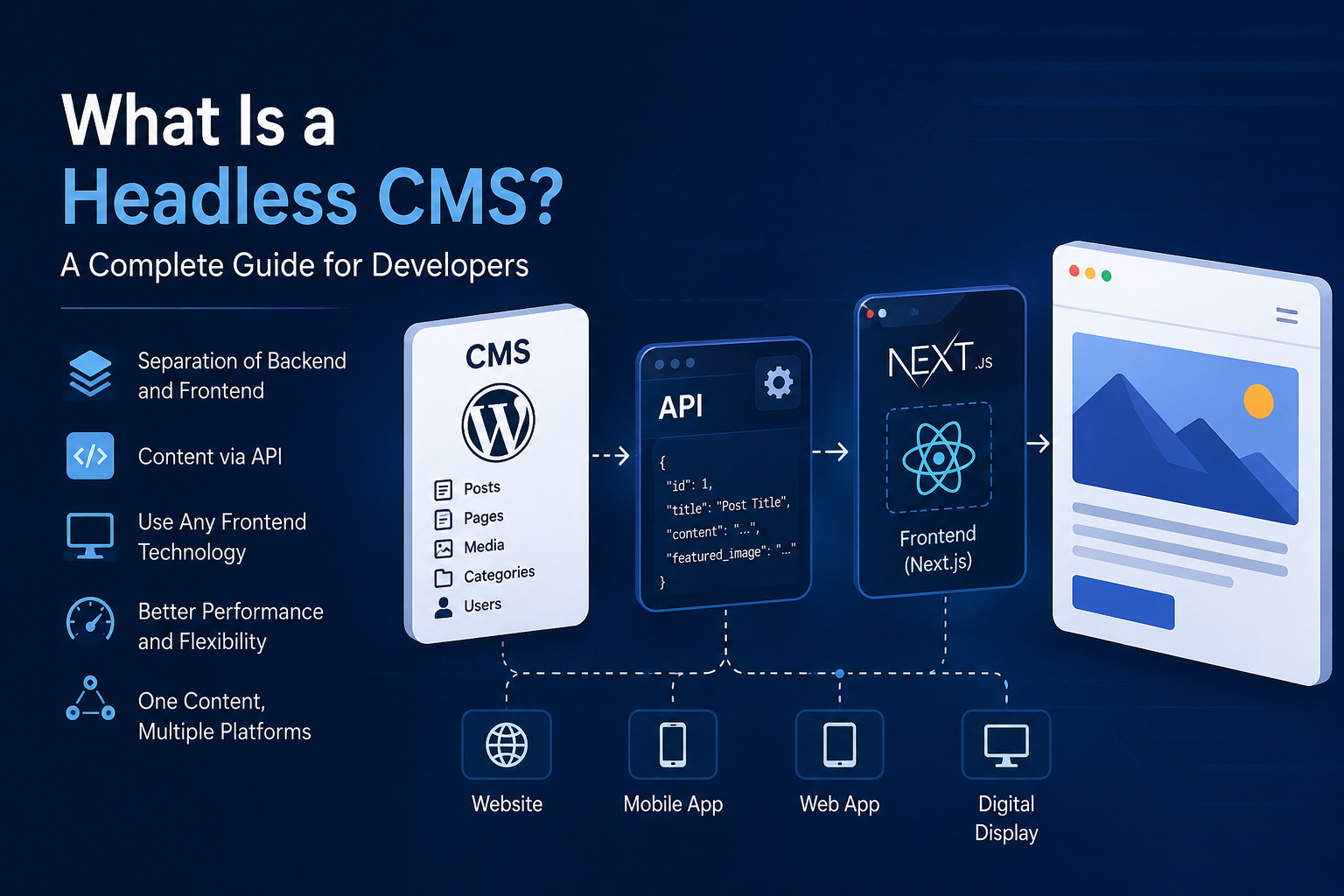
    A headless CMS separates the content management system from the website’s frontend. This allows developers to manage content in one place while using modern technologies such as Next.js, React, Vue, or other frameworks to build the actual website.

    In this guide, we’ll look at what a headless CMS is, how it works, its advantages and disadvantages, and when developers should consider using one.

    What Is a Headless CMS?

    A headless CMS is a content management system that provides a backend for creating and managing content without controlling how that content is displayed.

    Traditional CMS platforms usually combine two major components:

    • Content management
    • Website presentation

    A headless CMS separates them.

    The CMS manages content and exposes that content through an API. A frontend application then retrieves the content and decides how it should be displayed.

    A simple architecture looks like this:

    CMS → API → Frontend → User

    For example, WordPress can be used as the content management system while Next.js handles the frontend.

    WordPress manages posts, pages, images, categories, and other content. Next.js retrieves that information through an API and renders it as a modern website.

    How Does a Headless CMS Work?

    The basic process is relatively simple.

    First, an administrator creates content inside the CMS. The content is stored in the CMS database.

    The CMS then exposes that content through an API, usually using REST or GraphQL.

    The frontend application sends a request to the API and receives structured data, commonly in JSON format.

    For example:

    Frontend
       ↓
    API Request
       ↓
    Headless CMS
       ↓
    JSON Response
       ↓
    Frontend
       ↓
    Web Page
    

    This separation means the CMS doesn’t need to know exactly how the website looks.

    The frontend is responsible for presentation, while the CMS is responsible for content.

    Traditional CMS vs Headless CMS

    In a traditional CMS, the backend and frontend are closely connected.

    For example:

    WordPress
       ↓
    Theme
       ↓
    HTML Website
       ↓
    Visitor
    

    The CMS controls both the content and the presentation.

    With a headless architecture, the structure is different:

    WordPress
       ↓
    REST API
       ↓
    Next.js
       ↓
    Website
       ↓
    Visitor
    

    The CMS becomes a content platform rather than the website itself.

    Why Use a Headless CMS?

    There are several reasons developers choose this architecture.

    1. Flexible Frontend

    Developers can use modern frontend technologies without being restricted by the CMS theme system.

    For example, a team can use:

    • Next.js
    • React
    • Vue
    • Nuxt
    • Svelte
    • Astro

    The CMS doesn’t dictate the frontend technology.

    2. Better Developer Experience

    Modern frameworks provide powerful tools for routing, rendering, caching, image optimization, and application development.

    Instead of modifying a traditional CMS theme, developers can build the frontend using the tools and architecture they already know.

    3. Reusable Content

    The same content can be used across multiple platforms.

    For example, a company could use one CMS to provide content to:

    Website
    Mobile App
    Web Application
    Digital Display
    Other Services
    

    The content remains in one central location while different applications consume it through APIs.

    4. Improved Performance

    A modern frontend framework can use techniques such as static generation, server-side rendering, caching, and edge delivery.

    This can result in very fast websites when the architecture is implemented correctly.

    However, a headless CMS does not automatically make a website faster. Performance depends on how the frontend and API are designed.

    5. Better Separation of Responsibilities

    The content team can work inside the CMS while developers work on the frontend independently.

    This creates a cleaner separation:

    Content Team
         ↓
        CMS
         ↓
        API
         ↓
    Developers
         ↓
     Frontend
    

    Is WordPress a Headless CMS?

    WordPress was originally designed primarily as a traditional CMS, but it can also be used as a headless CMS.

    WordPress provides a REST API that allows external applications to retrieve content.

    For example:

    /wp-json/wp/v2/posts
    

    can return WordPress posts as JSON data.

    A frontend application can then use that information to create its own pages.

    This makes WordPress an attractive option for teams that want the familiar WordPress administration interface while using a modern frontend.

    Headless WordPress With Next.js

    One popular combination is WordPress with Next.js.

    The architecture can look like this:

                  WordPress
                 CMS / Admin
                      │
                      │ REST API
                      ▼
                   Next.js
                  Frontend
                      │
                      ▼
                  Website
    

    WordPress handles:

    • Blog posts
    • Pages
    • Categories
    • Media
    • Authors
    • Custom content

    Next.js handles:

    • Routing
    • UI
    • Page rendering
    • Performance
    • Metadata
    • Structured data
    • User experience

    This gives developers the flexibility of a modern frontend while keeping WordPress’s content management capabilities.

    What Are the Disadvantages?

    Headless CMS architecture isn’t perfect for every project.

    More Development Work

    You now have two separate systems instead of one.

    Developers need to build and maintain the frontend separately from the CMS.

    API Dependency

    The frontend depends on the CMS API.

    If the API becomes unavailable or is poorly designed, the frontend may be affected depending on the application’s caching and rendering strategy.

    More Complex Deployment

    A traditional WordPress website can often be deployed as a single application.

    A headless architecture usually requires managing both the CMS and frontend environments.

    SEO Requires Proper Implementation

    A headless CMS does not automatically provide good SEO.

    The frontend must correctly generate:

    • Page titles
    • Meta descriptions
    • Canonical URLs
    • Open Graph metadata
    • Structured data
    • Sitemaps
    • Robots directives

    The CMS can store SEO information, but the frontend must use that information correctly.

    When Should You Use a Headless CMS?

    A headless CMS is particularly useful when:

    • You want a highly customized frontend.
    • You want to use modern frontend frameworks.
    • The same content needs to be used across multiple platforms.
    • Performance is an important requirement.
    • Developers need complete control over the user interface.
    • Your content management system is separate from your website.

    For a simple blog or small business website, a traditional CMS may be easier and faster.

    For larger applications, custom platforms, content-heavy websites, and products requiring a highly customized frontend, headless architecture can be a strong choice.

    Final Thoughts

    A headless CMS changes the relationship between content and presentation.

    Instead of asking the CMS to control the entire website, the CMS becomes a central place to manage content while the frontend application controls the user experience.

    The result is a more flexible architecture:

    Content
       ↓
    CMS
       ↓
    API
       ↓
    Modern Frontend
       ↓
    Users
    

    WordPress, combined with a framework such as Next.js, is one example of how this architecture can be implemented.

    The most important thing is not simply choosing a headless CMS. The real advantage comes from designing the CMS, API, frontend, caching, security, and SEO strategy to work together as one system.